

Download SoftPerfect RAM Disk – Free RAM Disk Software for Windows, Fast Temporary Storage & System Boost
Why Use SoftPerfect RAM Disk for Maximum Performance?
In today’s fast-paced digital world, every millisecond counts. Whether you're editing high-resolution videos, compiling code, or running intensive games, your system’s storage speed can make or break your workflow. Enter SoftPerfect RAM Disk – a powerful, lightweight software tool designed to transform your computer’s idle RAM into a blazing-fast virtual drive. Unlike traditional hard drives or even SSDs, RAM operates at speeds measured in nanoseconds, making it ideal for temporary data handling. By creating a RAM disk, you’re essentially turning your computer’s memory into a super-fast storage layer that dramatically reduces load times and improves application responsiveness.
One of the standout features of SoftPerfect RAM Disk is its ability to use unused RAM as a high-performance storage medium. Modern PCs typically come with 8GB, 16GB, or even 32GB of RAM, yet a significant portion remains idle during everyday tasks. SoftPerfect RAM Disk taps into this untapped resource, allowing you to create up to 26 virtual drives simultaneously. These drives can be configured to store temporary files, browser caches, or project files, effectively offloading work from your primary SSD or HDD. This not only speeds up operations but also reduces wear and tear on your physical storage, extending its lifespan.
Another major advantage is the software’s intelligent data persistence. Unlike other RAM disk tools that lose data after a reboot, SoftPerfect RAM Disk can save your disk contents to a file and restore them at startup. This ensures that your frequently used files remain accessible across sessions without needing to re-copy them. Whether you're a developer working on large projects, a video editor processing 4K footage, or a gamer looking to reduce loading times, this tool delivers real, measurable performance gains. With a clean, intuitive interface and minimal system footprint, SoftPerfect RAM Disk is a must-have utility for any performance-conscious Windows user.
Key Features & Benefits of SoftPerfect RAM Disk
- Blazing-Fast Performance – Leverage RAM speeds up to 100x faster than SSDs for instant file access and processing.
- Multiple RAM Disks – Create up to 26 virtual drives simultaneously, ideal for organizing temporary files by project or application.
- Data Persistence – Save and restore disk contents across reboots, ensuring your work isn’t lost after shutdown.
- Automatic Configuration – Set your RAM disk as the default location for Windows temporary files (Temp, TMP, etc.) with one click.
- Secure & Lightweight – Minimal resource usage, no background processes, and no third-party dependencies.
- Free for Personal Use – Download and use the full-featured version at no cost, with no watermarks or trial limitations.
- Easy Integration – Works seamlessly with Windows 10, 11, and various server editions without complex setup.
SoftPerfect RAM Disk stands out in the crowded field of system optimization tools by offering both power and simplicity. The software doesn’t just create a RAM disk—it intelligently integrates with your system to optimize performance at the OS level. For example, you can configure it to automatically redirect Windows temporary folders to your RAM disk, ensuring that every system operation benefits from faster storage. This is particularly useful for applications like web browsers, IDEs, and virtual machines, which constantly generate temporary files.
Another unique feature is the ability to use a RAM disk as a cache for frequently accessed files. This means your system can load programs, documents, and media faster than ever before. The software also supports automatic disk creation at boot, so you don’t need to manually start it every time. With a clean, no-nonsense interface, even beginners can set up and manage RAM disks in minutes. And since it’s free for personal use, there’s no risk in trying it out.
Installation, Setup & Usage Guide
Getting started with SoftPerfect RAM Disk is quick and straightforward. Begin by visiting the official SoftPerfect website and downloading the latest version of the software. The installer is lightweight (under 5MB), fast, and requires no administrative privileges for basic use. Once downloaded, run the installer and follow the on-screen prompts. The process takes less than a minute, and you’ll be ready to create your first RAM disk.
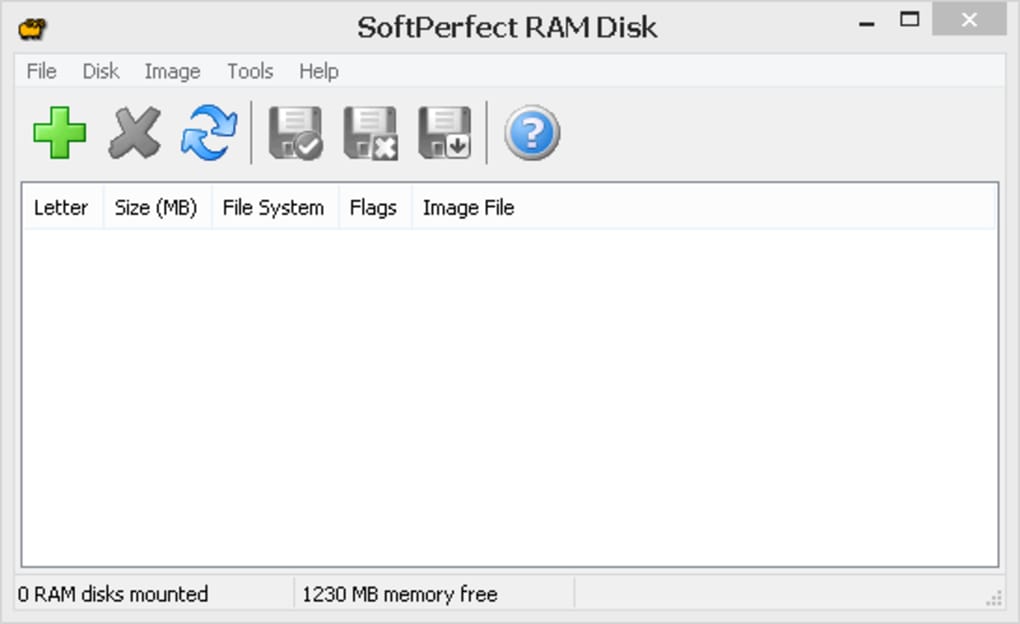
After installation, launch the application. You’ll be greeted with a clean, user-friendly interface that displays all available RAM disk settings. Click on “Add” to create a new RAM disk.
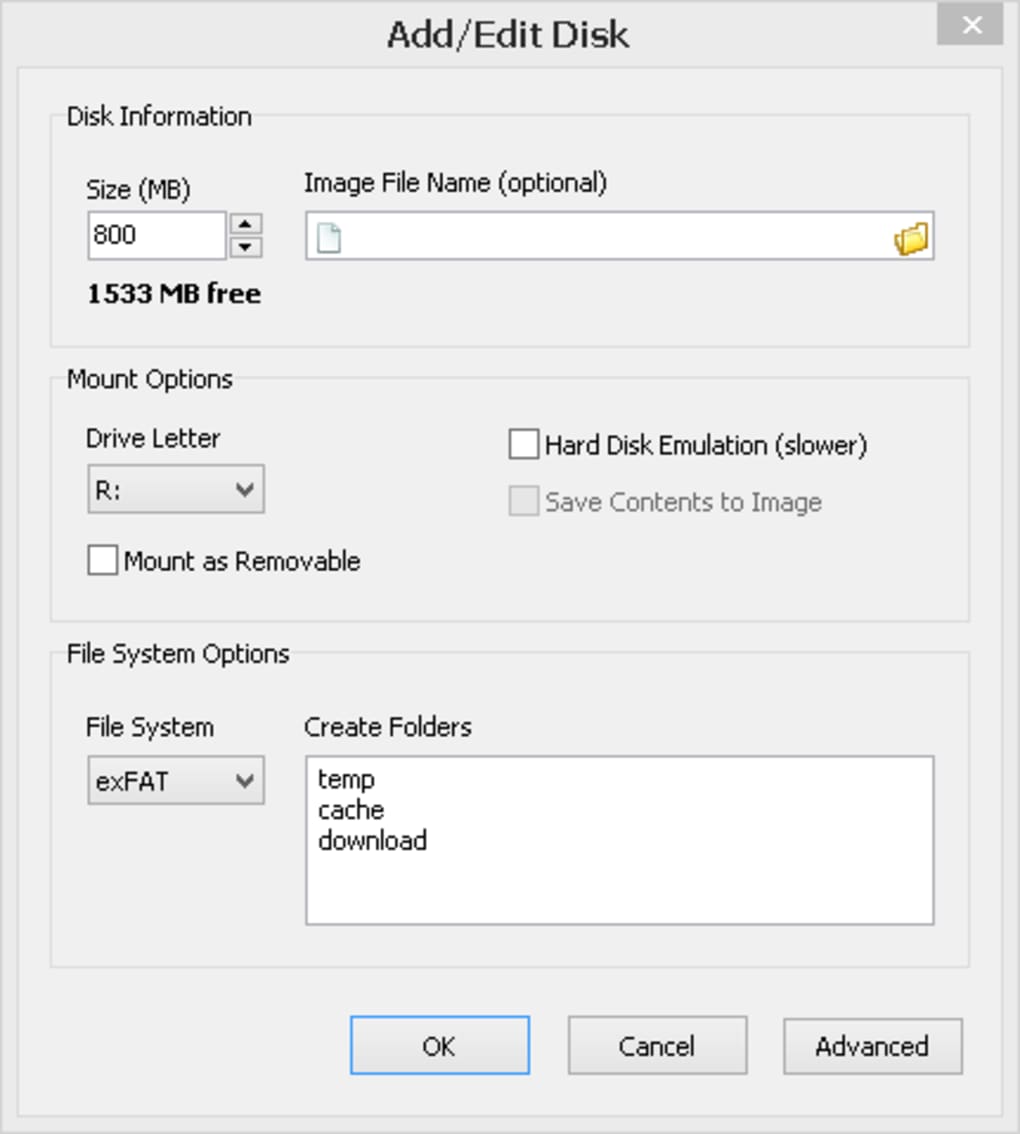
You’ll be prompted to choose a drive letter (e.g., D:, E:), set the size (from 10MB up to your available RAM), and select the disk type. The software supports both “Standard” and “Persistent” modes. In Standard mode, data is lost on reboot; in Persistent mode, data is saved to a file and restored on startup.
For optimal performance, configure your RAM disk to store temporary files. In the “Settings” tab, navigate to “Windows Temporary Files” and select your RAM disk as the default location. This ensures that applications like Chrome, Visual Studio, or Adobe Creative Suite use the high-speed RAM disk instead of your SSD. You can also manually copy files to the RAM disk for faster access during intensive tasks.
To automate the process, enable “Start with Windows” in the preferences. This ensures your RAM disk is created every time you boot up. The software runs in the background with minimal impact on system resources, making it ideal for long-term use. For advanced users, the tool also supports command-line options and scripting for automated deployment in enterprise environments.
Compatibility & System Requirements
SoftPerfect RAM Disk is designed exclusively for the Windows operating system, supporting Windows 10, Windows 11, and Windows Server editions (2016, 2019, 2022). It’s compatible with both 32-bit and 64-bit architectures, making it accessible to a wide range of users. The software requires a minimum of 1GB of free RAM to function, though we recommend at least 4GB for meaningful performance gains.
Since RAM disks operate at the kernel level, the software integrates deeply with Windows’ file system and driver architecture. It uses native Windows drivers to ensure stability and compatibility. No additional software or third-party tools are required, and the application does not interfere with other system processes. This makes it a secure and reliable choice for both home users and professionals.
While SoftPerfect RAM Disk is not available for Mac, Linux, Android, or iOS, it remains one of the most robust and trusted tools in its category for Windows users. Its focus on performance, security, and ease of use has earned it a loyal following among power users, developers, and system administrators. Whether you're using a laptop with limited SSD space or a high-end desktop with 32GB of RAM, this tool adapts to your needs.
Pros and Cons
Pros
- Extremely fast read/write speeds – outperforms even the fastest SSDs
- Free for personal and non-commercial use
- Supports up to 26 RAM disks simultaneously
- Data persistence across reboots with optional save/load
- Easy integration with Windows temporary file system
- Minimal system resource usage
- Simple, clean, and intuitive interface
- Automatic startup and configuration options
Cons
- Only available for Windows (no Mac or Linux version)
- Data is lost if power is cut unexpectedly (standard RAM behavior)
- Requires sufficient RAM to be effective (not ideal for systems with 4GB or less)
- Advanced features require some technical understanding
Frequently Asked Questions (FAQ)
Conclusion: Is SoftPerfect RAM Disk Worth It?
If you’re looking to give your Windows PC a serious performance boost, SoftPerfect RAM Disk is one of the best tools available. Its ability to turn idle RAM into a high-speed virtual drive delivers real-world benefits—faster boot times, quicker application launches, and smoother multitasking. Whether you're a developer, creative professional, or gamer, this software helps reduce reliance on slower storage and extends the life of your SSD or HDD.
With a free license, intuitive interface, and powerful features like data persistence and automatic temporary file redirection, it’s a no-brainer for performance enthusiasts. While it’s limited to Windows, its reliability and efficiency make it a top choice in its category. If you’re ready to unlock the full potential of your system’s memory, download SoftPerfect RAM Disk today and experience the speed difference for yourself.
Download now and transform your PC’s performance with a secure, fast, and free RAM disk solution.







